 Community expert Angela Crocker spoke to Vancouver Radio CKNW’s Bill Good about creating social networks.
Want to know why it’s important, and why it’s not as scary as you may think? In this interview, they discussed the value of using social media tools, the demographics that can be found on various social sites and common concerns about using social networks. Have a listen to this 20 minute March 15, 2011 episode of The Bill Good Show.
 To block someone, visit their profile page and look at the bottom of the left hand column. Click on “Report/Block This Person”.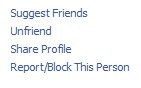
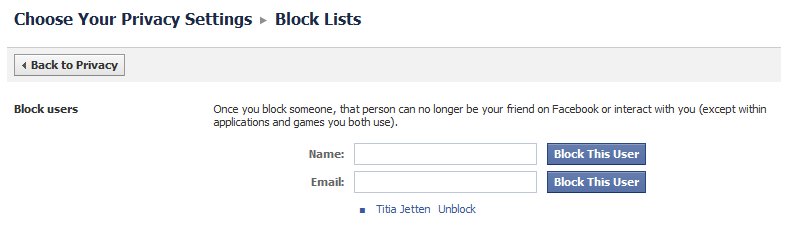
 Now, get out your reading glasses and look towards the bottom of the page for a little red symbol and the headline Block Lists. Click on “Edit your lists”.
 From this screen you can both block and unblock users. Any friends you’ve blocked will appear in a list under the Name and Email boxes. In the illustration, you’ll see the name Titia Jetten. (Again, just a temporary block to illustrate this lesson!). Click “unblock” next to the friend’s name to finish the task.